The Hidden Cost of a Slow Magento/Adobe Commerce Admin
TL:DR
Admin lag is a hidden expense costing tens of thousands of pounds annually in wasted staff wages and restricted capacity.
Synchronous external HTTP calls and poorly written plugins waste CPU resources and create severe server latency.
Untuned Redis locks and unoptimised database queries risk data corruption and system crashes during peak trading.
Running indexers in real time or leaving development tools active in production artificially throttles operational output.
These backend performance bottlenecks are fixable issues caused by accumulated technical debt rather than inherent platform limitations.
Foreword
Most performance conversations in the Adobe Commerce world focus on the storefront. Page speed. Core Web Vitals. LCP under 2.5 seconds. And rightly so, every 100ms of storefront latency has a measurable conversion impact.
But there is another surface that nobody talks about, and it is costing enterprise merchants far more than they realise.
The admin.
Every operator, merchandiser, and customer service agent your business employs spends their entire working day inside the Magento admin. And on the vast majority of Adobe Commerce installations we audit, it is slow. Not "a bit laggy" slow. We regularly profile admin routes returning 6, 8, sometimes 12-second cold responses on stores doing serious revenue.
This is not a platform problem. Adobe Commerce is highly capable of sub-1.5 second admin responses on a warm cache. It is significantly less likely to crash at 2 AM than your agency’s bespoke microservices architecture. The gap between what the platform can deliver and what most installations actually deliver comes down to a set of well-understood, fixable issues, most of which were introduced silently, one third-party module installed at a time.
Here is the unvarnished reality of what is slowing down your operations, and precisely why it matters to your bottom line.
1. The Issue Nobody Is Measuring
Storefront performance gets measured because it has an obvious commercial signal. A slow storefront equals a lower conversion rate, and that shows up in revenue reports.
Admin performance does not have that signal. Nobody tracks "time wasted waiting for the order grid to load" in a dashboard. So, technical debt accumulates.
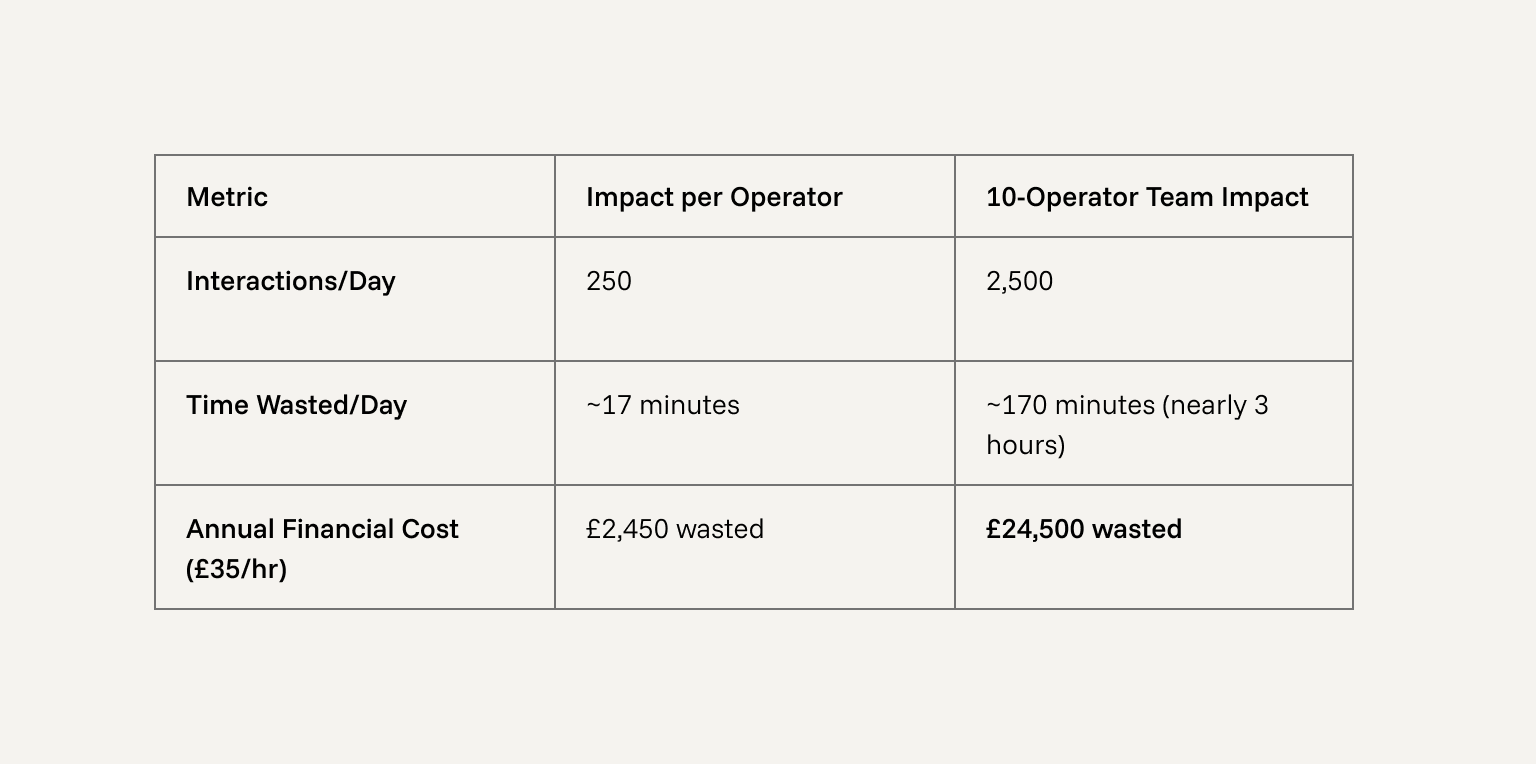
Consider the maths. A typical admin user makes 150 to 300 interactions per day: opening orders, saving product changes, checking customer records, updating config. If each interaction carries 4 seconds of avoidable latency above what the platform is capable of, the losses are staggering.
That figure does not include the compounding effects. During peak trading, a slow admin response means slower order processing, longer customer service calls, and more errors from frustrated operators hitting 'submit' twice.
The "So What?": You are paying tens of thousands of pounds annually in wages for your staff to stare at loading spinners. This directly restricts how many orders your team can process per hour, forcing you to hire more staff to overcome bad engineering.
2. Synchronous External HTTP Calls: The Invisible Blocker
The single most common cause of sudden, unexplained admin slowness is a third-party module making an outbound HTTP call during the page render cycle. These calls are typically version checks, licence validations, or marketplace feed polls. Because they are network calls, they block PHP execution until the remote server responds, or times out.
On a recent Blackfire profiling audit, we found an admin dashboard making three separate outbound HTTP calls on every page load, including a call to api.github.com from a payment gateway module checking its own version. Combined, these added 1.8 seconds to every dashboard load. The merchant had no idea.
The Fix: Move the call to a scheduled cron job or disable it. We disable Magento_Marketplace and Magento_AdminAnalytics on every production engagement.
The "So What?": Synchronous external calls hold your servers hostage to a third party's uptime. When their API degrades, your warehouse operators are physically unable to print shipping labels, grinding fulfillment to an immediate halt.
3. Observer and Plugin Overhead
Every observer and plugin registered in your codebase adds overhead. In the storefront, the full-page cache means most requests never reach PHP. In the admin, every page load runs the full stack.
We specifically flag around plugins on high-frequency methods (like FrontController::dispatch). An around plugin wraps the entire method execution, adding a stack frame and overhead even if it does nothing. We frequently find third-party modules using these when a far cheaper after plugin would have sufficed.
The "So What?": Zombie observers and poorly written plugins drastically increase CPU utilisation. You end up over-provisioning AWS infrastructure to handle the load, actively burning margin on server costs to support sloppy code.
4. Session Lock Contention
Magento stores admin sessions in Redis. Redis sessions use a locking mechanism to prevent concurrent writes from corrupting data, which is correct behaviour.
The problem arises when the lock configuration is not tuned. The setting session/redis/break_after_adminhtml controls how long a process waits to acquire a session lock before breaking it. On many installations, this is left at the storefront default, creating massive lock wait times in the admin where requests take longer to resolve. Tuning max_concurrency and break_after_adminhtml typically shaves 200–400ms off affected requests.
Note: session/redis/disable_locking should always be 0 for admin. Disabling locking entirely causes genuine session data corruption.
The "So What?": Session gridlock causes silent failures during peak trading. If two customer service agents edit orders concurrently and the sessions corrupt, you lose customer data, leading directly to mis-shipped orders and furious clients.
Is your admin costing you more than you think? Find out by getting in touch with the Ayko team.
5. Redis Cache Infrastructure
The admin bypasses the full-page cache but hits the default cache constantly (layout XML, configuration, EAV metadata).
If the default cache backend is Zend_Cache_Backend_File rather than Redis, every cache read and write goes through filesystem I/O. Furthermore, the three Redis databases (default cache, full-page cache, and sessions) must be isolated on separate DB indexes. We regularly find installations where all three share DB 0, making targeted flushes impossible.
The "So What?": Filesystem I/O contention does not stay confined to the admin. It slows down the entire server at the operating system level. A merchandiser saving a complex product can inadvertently cause storefront load times to spike, immediately costing you conversions.
6. Realtime Indexers Blocking Admin Saves
Adobe Commerce indexers operate in two modes: Realtime and Schedule.
In Realtime mode, saving a configurable product with dozens of variants and pricing rules forces the indexers to run synchronously, adding several seconds to the save.
Running bin/magento indexer:status frequently reveals catalog_product_price and catalogsearch_fulltext running in Realtime mode. Moving all indexers to Schedule mode removes the blocking overhead entirely. Reindexing then happens asynchronously via cron.
The "So What?": Synchronous indexing freezes your merchandising team during critical campaign launches. If a price change takes 15 seconds to save, your team will inevitably miss go-live deadlines for major promotions.
7. Deployment Artefact Integrity
When Adobe Commerce runs in developer mode, DI compilation happens on-demand and static content is generated on the fly. This adds hundreds of milliseconds to admin requests, which load significantly more assets than the storefront.
We routinely find production stores running in developer mode due to rushed deployments. The check is simple: bin/magento deploy:mode:show. If the answer isn't production, fix it immediately.
The "So What?": A lazy deployment pipeline turns your production environment into a sandbox. This degrades the administrative experience so severely that staff morale plummets, and operational throughput is artificially capped until the next release.
8. Debug and Development Settings in Production
Development tooling left active in production is a textbook unforced error.
Template hints: dev/debug/template_hints_admin = 1 forces a full layout render on every request.
JS bundling: dev/js/enable_js_bundling = 1 in an HTTP/2 environment actively makes admin JS loading worse by forcing monolithic downloads.
The "So What?": Leaving debug settings on is akin to driving a sports car with the handbrake applied. You are paying top-tier enterprise hosting fees but getting budget-level performance, entirely wasting your infrastructure investment.
9. PHP and PHP-FPM Infrastructure
Because the admin hits the full PHP stack, FPM pool configuration is critical. Left at the default, FPM workers run indefinitely and accumulate memory from long-running admin processes. Setting pm.max_requests to 1000 recycles workers and keeps RSS stable. Equally vital is max_input_vars. Magento saves massive POST payloads. If this is set below 75,000, configuration saves silently truncate.
The "So What?": Silent data truncation from low max_input_vars forces staff to repeat their work, doubling operational costs for basic tasks. They assume it's a "caching issue," and your agency bills you hours to investigate a fundamentally broken server config.
10. MySQL: Slow Queries and Table Bloat
Admin grid queries are the most expensive database operations in the application. An EXPLAIN on the order list query frequently reveals a full table scan on a sales_order table with hundreds of thousands of rows.
Adding the right composite index for the columns the grid actually sorts and filters by is often the single highest-impact database change we make. Additionally, bloated tables like cron_schedule and MView changelog tables must be explicitly pruned via retention windows.
The "So What?": Database bloat is a ticking time bomb. Unoptimised grid queries lock up MySQL tables. During Black Friday, a single merchandiser trying to filter a bloated order grid can crash the database, taking your entire storefront offline during peak trading.
11. Elasticsearch and OpenSearch Admin Impact
The admin product grid relies on the search engine for filtering. We regularly audit stores with 80+ filterable attributes, many of which are internal-use fields that have no business being indexed.
Every unnecessary attribute increases the complexity of the query the engine has to process.
The "So What?": Bloated search clusters force you to upgrade to larger, more expensive AWS instances. You are spending thousands a year in unnecessary infrastructure overhead while actively providing your operators with a slower search experience.
12. Async Queue and Blocking Bulk Operations
Mass product attribute updates and bulk price changes hold the admin session open for the duration of the operation if executed synchronously. This usually results in timeouts, frustrated operators retrying, and duplicate execution.
Ensure Magento_AsynchronousOperations and Magento_BulkOperations are enabled, and that queue consumers are running. Similarly, order confirmation emails should be pushed to the queue (sales_email/general/async_sending = 1).
The "So What?": Synchronous operations create massive order processing bottlenecks. If your email server lags, saving an order lags. This directly delays dispatch, leading to an influx of WISMO (Where Is My Order) tickets that drown your customer service team.
13. Admin Grid and UI Configuration
The default admin product grids load more data than most users need. Furthermore, developers frequently increase default pagination limits from 20 to 100 or 200 rows. A 200-row order grid runs a vastly more expensive query and loads significantly more data into the browser.
The "So What?": Unchecked UI habits create a tragedy of the commons. One operator loading 200 rows of heavy order data forces an expensive database query that drags down performance for everyone else in the building. Standardising grids protects the team’s overall efficiency.
What the Audit Produces
In our experience, the admin performance gap on most Adobe Commerce installations is not a platform limitation. It is accumulated configuration drift, lazy deployments, and third-party module overhead that nobody has bothered to profile.
We run admin performance audits as a standalone engagement. The output is a Blackfire profile for every key admin route, alongside a full infrastructure review. We prioritise findings clearly:
P1: Fixing before the next sprint. Issues adding multiple seconds to every load.
P2: Scheduled this quarter. Configuration improvements and technical debt cleanup.
P3: Backlog. Baseline hygiene items.
If your team is waiting on admin pages multiple times per day, the cost is real and the fix is methodical. The platform is capable of a great deal more than most installations deliver. Get in touch to discuss an admin performance audit for your store.
Your admin should be an asset, not a bottleneck, and we know exactly how to make it one. Get in touch with the Ayko team today and let's map out what's holding your operations back.
By clicking "Accept all cookies", you agree to storing cookies on your device to enhance site navigation, analyse site usage and assist in our marketing efforts as outlined in our privacy policy.
By clicking 'Accept all cookies', you agree to storing cookies on your device to enhance site navigation, analyze site usage and assist in our marketing efforts as outlined in our privacy policy.