Breaking Down the Key Decision Factors
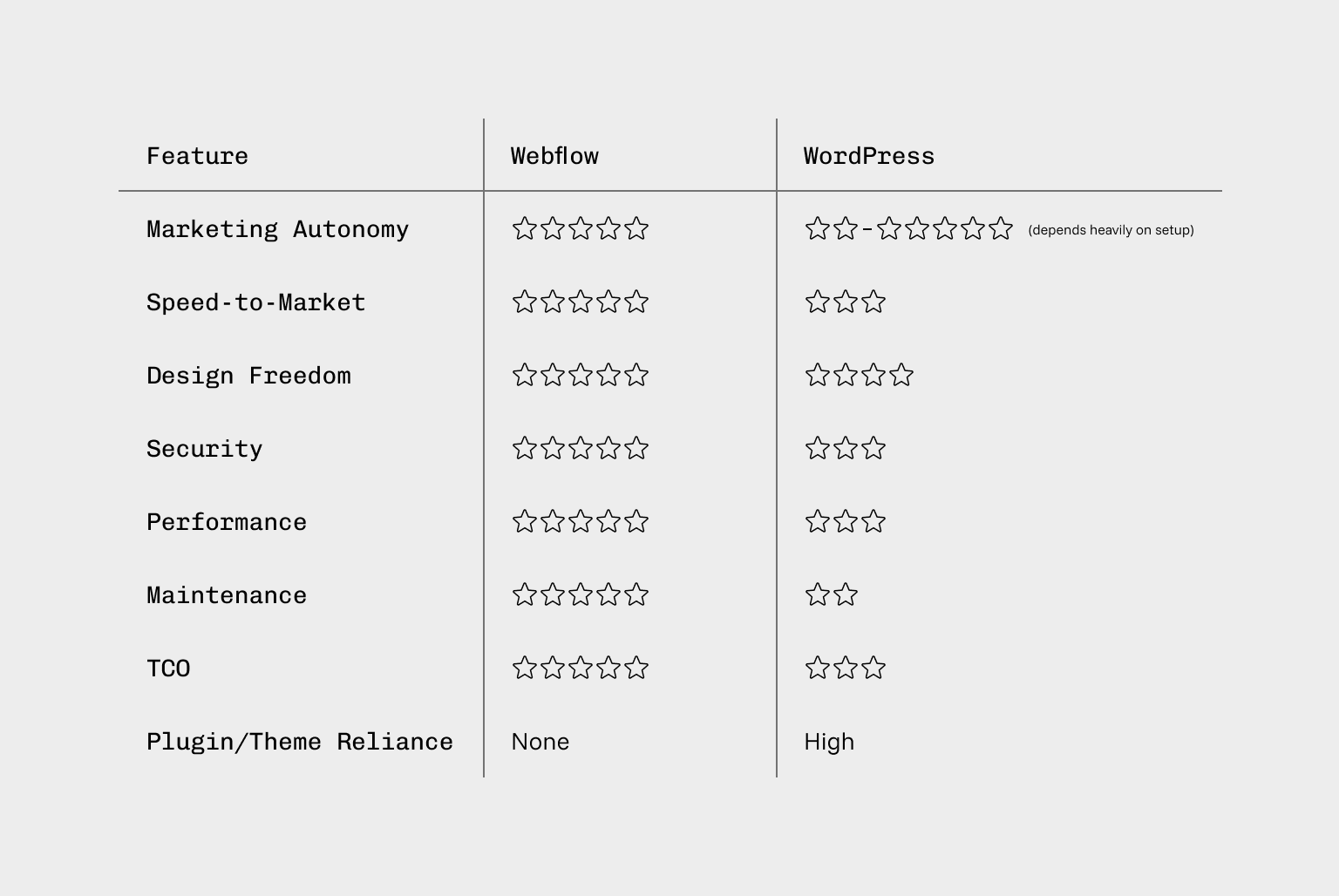
Marketing Autonomy and Why Webflow Comes Out on Top
For most B2B marketing teams, autonomy is critical.
With Webflow, marketers can:
- Edit content visually
- Create new pages from approved templates
- Spin up landing pages quickly
- Update imagery, CTAs, and modules without developers
- See changes in context before publishing
- Webflow was built for this kind of marketer empowerment.
With WordPress, autonomy depends on:
- The theme
- The page-builder used (Elementor, WPBakery, Gutenberg, Divi, etc.)
- How the developer set up the back end
- Plugin compatibility
Some WordPress setups give marketers good control. Many do not. And making the wrong choice often leads to inconsistent styling, broken pages, and technical debt.
For marketing teams that want speed and freedom, Webflow is the clear leader.
Speed to Market and Why Webflow Wins Again
Modern B2B businesses need fast campaign deployment, frequent content updates, rapid experimentation, and the ability to adapt quickly to changing market conditions. Webflow streamlines the entire website lifecycle by allowing designers and developers to build high-performance pages faster, while giving marketing teams the freedom to update content and launch campaigns without relying on developers.
While WordPress can deliver strong performance, it typically requires carefully chosen plugins, premium themes, custom development, and continuous optimisation to stay fast.
Over time, most WordPress websites slow down due to plugin bloat, technical debt, and legacy code, making Webflow a more scalable and efficient solution for B2B companies focused on long-term growth and site performance.
Understanding Total Cost of Ownership (TCO) and Why Webflow Is Often More Affordable
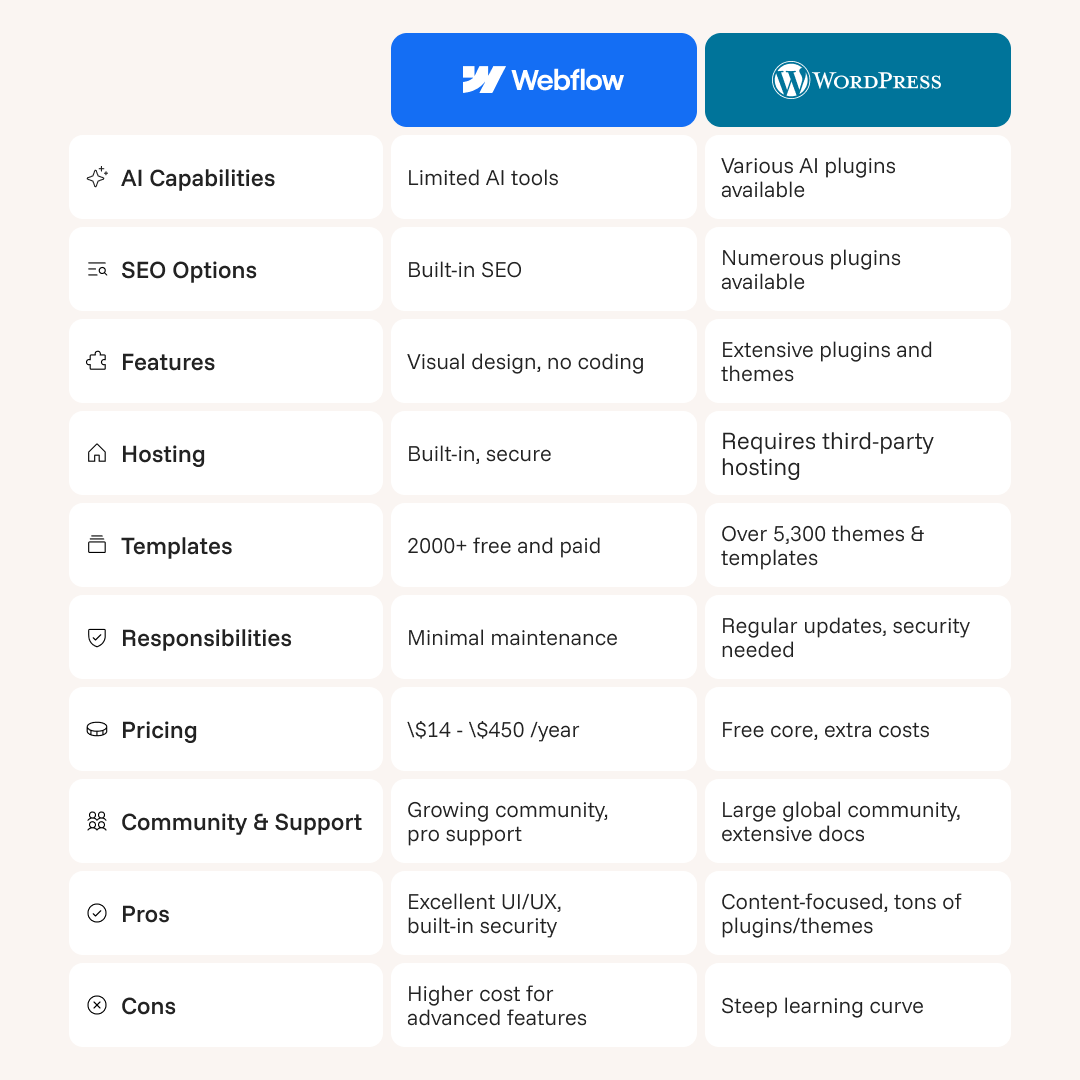
Many commercial teams assume WordPress is cheaper because plugins appear free. But hidden costs add up.
WordPress Ongoing Costs:
- Plugin licensing fees
- Developer hours for updates
- Security maintenance
- Hosting fees
- Break/fix issues
- Plugin conflicts
- Theme updates
- Infrastructure scaling
These costs compound over time, especially for B2B companies with complex web ecosystems.
Webflow Ongoing Costs:
- Workspace Plan (from $19/mo) for staging and collaboration
- Site Plan (from $23/mo) including hosting
With Webflow you also benefit from:
- No theme updates
- Minimal dev maintenance
- No security patching
In many cases, Webflow reduces long-term website spend by 30–60% while improving output quality.
Performance and Security and Why Webflow Outperforms WordPress
When it comes to performance and security, Webflow delivers more with less effort. Built on a global fast CDN, Webflow sites automatically include SSL, built-in security, and enterprise-grade hosting, all without relying on plugins or PHP, which can introduce vulnerabilities. Its clean, semantic code reduces points of failure, making it a lower-risk option for IT and security teams.
In contrast, WordPress requires regular manual updates, depends heavily on hosting and caching plugins for performance, and can be vulnerable to plugin and theme exploits. Code quality varies widely, meaning WordPress sites demand careful ongoing management to remain secure and high-performing.
Design Flexibility and Why Webflow Is Ideal for Brand Led Websites
Both WordPress and Webflow offer design flexibility, but in different ways. WordPress is highly flexible depending on theme capabilities, but page builders often introduce code bloat, and fully custom builds require extensive development.
Creative freedom can be limited by plugins. Webflow, on the other hand, provides full visual design freedom through a component-driven system that ensures brand consistency. Clean CSS class structures and fine control over interactions and animations make it ideal for brand-led B2B companies. For high-end, design-first websites, Webflow produces cleaner, more scalable front-end output, making it the better choice for agencies and in-house teams prioritising modern, professional design.